
ChatGPT’s New Computer History Feature Tracks Clicks and Keystrokes on Mac
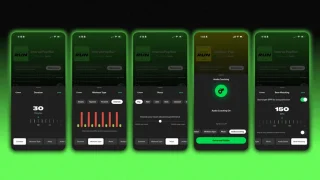
OpenAI has introduced a new Computer History feature for the ChatGPT desktop app on macOS that can remember what users do across apps and websites, allowing ChatGPT and Codex to use that activity to continue unfinished tasks, answer questions about recent work and suggest automations.
The feature is opt-in, meaning users must choose to enable it. Once activated, Computer History creates a timeline of activity that ChatGPT can reference later. Users can also exclude individual apps and websites and delete specific history entries.
ChatGPT Can Remember How You Work
According to The Verge, Computer History records interaction events such as clicks and keystrokes, as well as activity across apps and websites. This allows ChatGPT to build a picture of a user’s workflow rather than simply responding to information provided in the current conversation.
For example, an OpenAI demonstration showed ChatGPT finding the last document a user edited, checking whether it had been shared through Slack and providing a summary of how the user spent their morning.
The system can also identify repeated workflows and potentially turn them into skills or automations, giving ChatGPT a more persistent understanding of how someone works.
No Screenshots, Videos or Audio
OpenAI says Computer History works differently from Microsoft’s controversial Windows Recall feature.
Rather than periodically taking screenshots of the computer screen, OpenAI says its system records interaction events and does not capture images, video or audio. Activity from incognito or private browser sessions is also automatically excluded.
That distinction could help address some of the privacy concerns associated with continuously recording a user’s screen.
However, tracking keystrokes and clicks across a computer still raises significant privacy questions, particularly because those interactions can reveal sensitive information about what a person is doing.
Users Have Control Over the History
Computer History is designed with several controls that allow users to manage what ChatGPT can access.
Users can:
- Turn Computer History on or off
- Exclude specific apps
- Exclude specific websites
- Delete individual history entries
- Prevent private browsing activity from being included
The feature is currently being introduced for the ChatGPT macOS desktop app, rather than being a general feature available across every ChatGPT platform.
The new capability represents another step toward AI assistants that don’t just respond to prompts but maintain an ongoing understanding of a user’s digital workflow.
For users who prioritize productivity, Computer History could make ChatGPT substantially more useful for picking up unfinished work. For privacy-conscious users, however, the ability to monitor clicks and keystrokes across applications is likely to make the feature controversial.


About The Author